深入解析AutoGPT:原理、实战与源码拆解
介绍
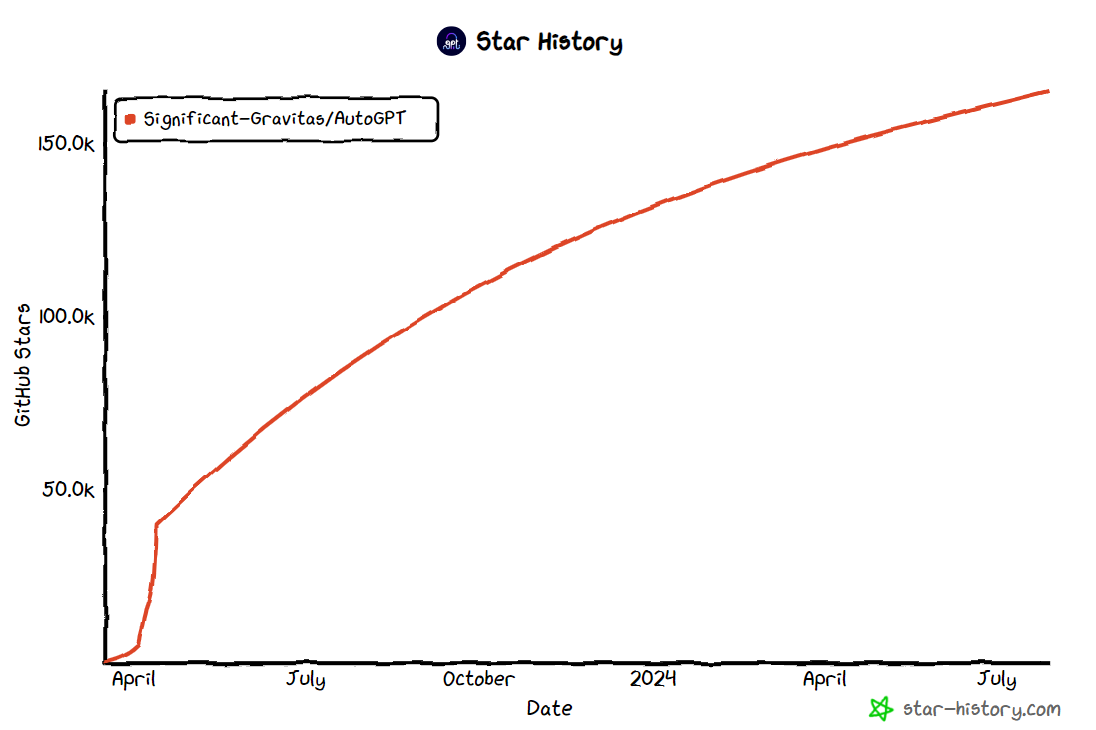
自ChatGPT发布以来,涌现了许多围绕大模型(即LLM)的应用开发框架,authGPT就是其中之一,在github上截止2024年7月达到160K颗star。这篇文章我们全面深入讲解autoGTP,首先了解autoGPT是什么,它的整体架构是怎么组织的,再通过实际使用示例来探究其运作原理及流程、最后对源码进行解析,来看它是如何实现的。
AutoGPT的概念是在OpenAI发布其GPT-4模型及其论文,阐述该模型的高级推理和任务解决能力时提出的。该概念其实相当简单:用户只需要提出目标,让LLM不断思考决定要做什么,需要采取什么行动,并将其行动的结果反馈到提示中,重新发送给大模型,让LLM继续思考下一步要做什么,采取什么行动…,如此不断迭代,使程序自主的逐步地朝着目标前进,最终完成用户的目标任务。
AutoGPT是一个开源的自主通用型AI Agent框架。它不是针对特定任务而设计的,相反,它是为了能够在许多学科中执行广泛的任务而设计的,只要这些任务可以在计算机上完成即可;同时它运用大模型推理决策的能力,根据决策结果自主行动,自动完成目标。这就是为什么叫自主型代理框架的原因。**这个框架的核心原理是利用大型语言模型(LLM)来自主决策和执行操作,观察执行的反馈结果不断迭代,从最终实现用户设定的目标。**AutoGPT扩展了基本ReAct(Reason + Act)框架,让语言模型不断进行思考和行动的循环,以自主迭代地朝着目标前进。
AutoGPT集成以下能力:
整体架构
可以说Auto-GPT是一项使大模型自动化来完成任务的尝试,那它是如何实现自主行为,逐步完成用户设定的目标呢? 我们来看下Auto-GPT的整体运行架构。
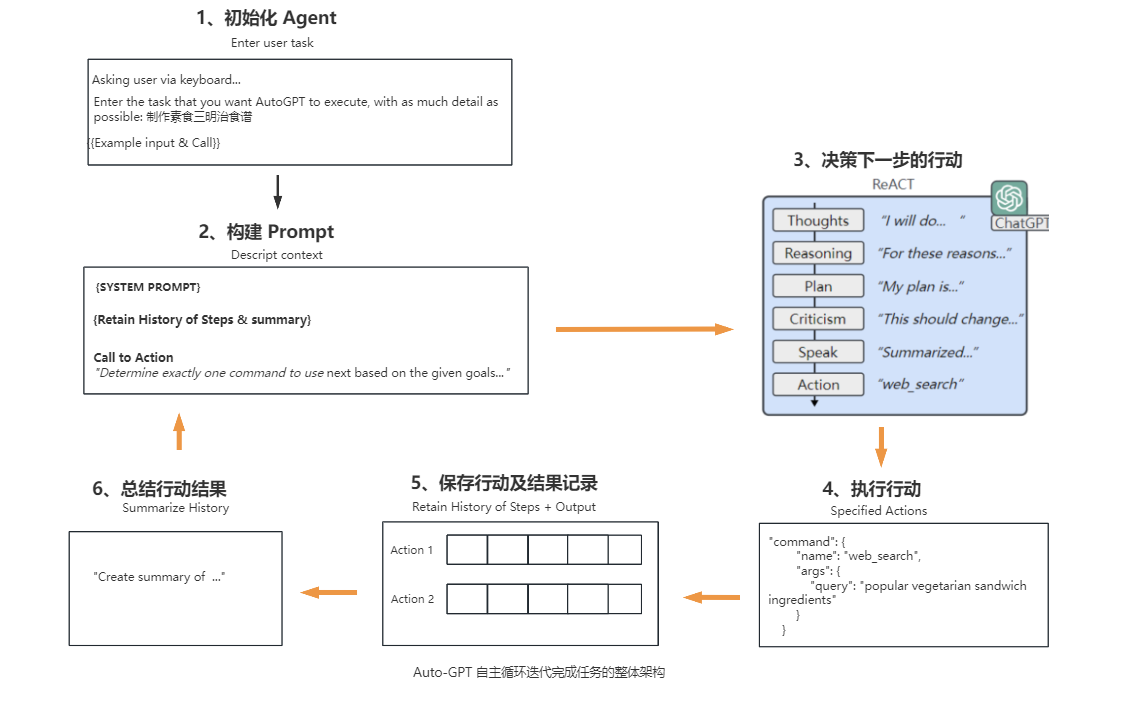
Auto-GPT的核心运作流程主要可分为6个步骤,具体如下:
-
初始化Agent,Auto-GPT首先会检查是否已经存在Agent,若存在,用户可以选择其中一个Agent继续;若不存在或不使用之前的,则可以创建一个新的Agent。创建Agent,需要用户输入一个任务,尽可能提供详细描述。auth-GPT会将该任务描述结合一个返回的示例样本构建提示词,发送给大模型,由大模型生成Agent的名称、任务描述,及最佳实践和约束条件中每个分别1到5个指令,这些指令与成功完成分配的任务保持最佳一致。通过大模型生成的这些信息结合基础的配置参数创建Agent。
-
构建Prompt,整合上一步大模型生成的任务描述、最佳实践和约束条件的指令与基础提示模板、参数文件(prompt_settings.yaml、ai_settings.yaml等)的信息、构建完整提示词,要求大模型根据给定的目标和到目前为止所执行的行动步骤,确定下一步要使用的命令,并使用指定的JSON格式进行响应。
-
决策下一步的行动,这是关键核心的一步,大模型进行思考推理并作出决策,按JSON格式生成下一步需要执行的行动及相关参数。该步骤大模型会进行如下思考过程:
- observations:观察最后一个动作的执行结果(如果有的话)。
- Thoughts:做出思考结论,将要做什么。
- reasoning:推理,为什么得出这个思考结论。
- self_criticism:建设性的自我批评。
- plan:计划,形成简短的项目符号列表传达计划。
- speak:总结想法,说给用户(如果有文本转语音模型,可以把它播放出来)。
以上的思考过程,实际上是扩展ReAct(Reason + Act)框架,让模型观察思考、做出决策,生成下一步行动的命令。
-
执行行动,根据大模型返回的下一步要执行的命令名称,调用对应的命令函数,获得执行结果。
-
保存行动结果,记录本次执行的行动及结果,添加到历史行动数据集中存储。
-
生成总结,根据行动及结果等信息,使用LLM(大型语言模型)生成行动的摘要,保留具体事实信息。
-
重新构建Prompt,整合之前的行动步骤及其结果,重新构建Prompt,进入下一轮循环(2-6步骤),直到程序中断或大模型决策可以结束任务,输出下一步执行的命令名称是finish。
以上是AutoGPT主要的运行流程。在“运行流程”章节,再通过运行一个实例来详细讲解每一步骤。
安装使用
首先确保先安装了 Python 3.9以上版本。
安装poetry
AutoGPT项目由于支持执行Python代码,处于安全考虑,这个系统为每个Agent都创建了一个独立的虚拟环境,这套虚拟环境的管理是通过Poetry实现的,所以需要先安装Poetry, 关于Poetry的详细介绍,可见https://python-poetry.org/。
安装poetry
方法1:
方法2:
Linux, macOS, Windows (WSL)系统
需求先安装curl。
Linux, macOS, Windows (Windows 上的 Linux 子系统)使用如下指令:
1
2
3
4
5
6
|
Poetry 要求Python 版本为2.7 或者3.5+

python3:
    curl -sSL https://install.python-poetry.org | python3 -
python2:
    curl -sSL https://install.python-poetry.org | python2 -
|
Windows系统
打开 Powershell,使用如下指令
1
|
(Invoke-WebRequest -Uri https://install.python-poetry.org -UseBasicParsing).Content | py -
|
上面都会安装在默认的路径。
配置环境变量
安装完成后,需要添加Poetry安装目录添加进环境变量。
Linux, macOS, Windows (WSL)系统
Poetry的安装后的默认路径: $HOME/.local/bin, 以下是安装后添加进环境变量的方式
1
2
3
4
5
6
7
|
1. 对于 Bash 终端,可以执行以下命令打开 ~/.bashrc 文件:
   nano ~/.bashrc
2. 在文件中添加以下行:
   export PATH=$HOME/.local/bin:$PATH
3. 保存并关闭文件后,使用以下命令使修改生效:
   source ~/.bashrc
|
window系统(以window10为例子)
使用安装方法1,安装成功后会提示poetry.exe 安装的目录路径,如下图画黄线的就是安装的目录:
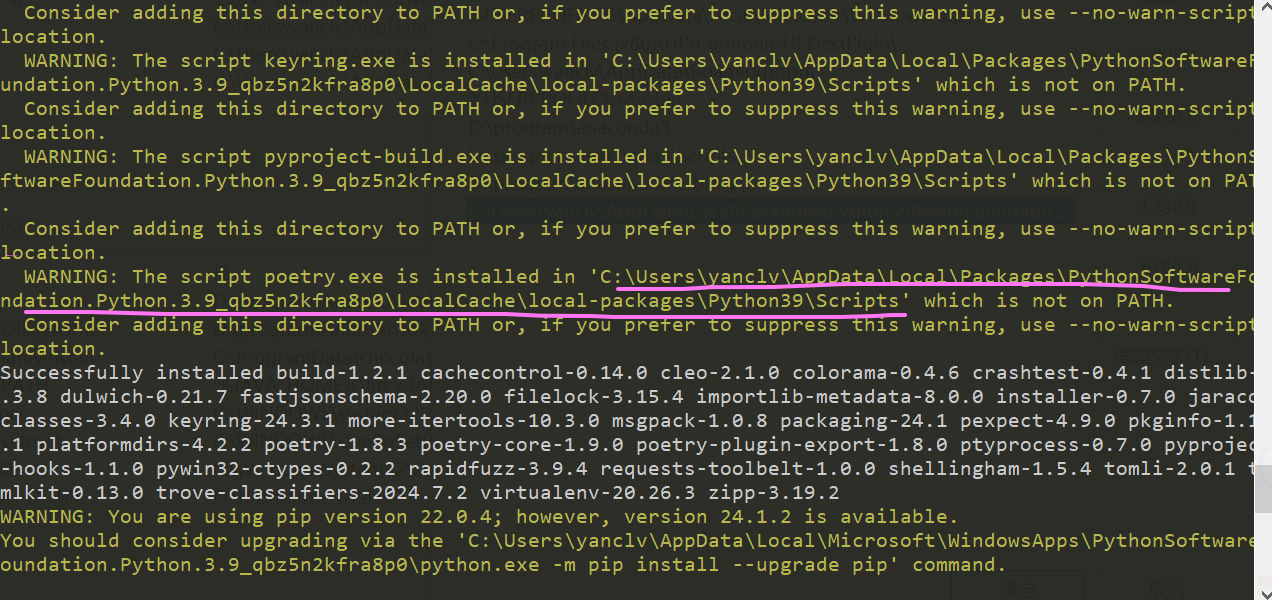
添加到环境变量步骤:
-
右键单击 “此电脑”-> “属性”->选择 “高级” 选项卡->点击 “环境变量” 按钮。
-
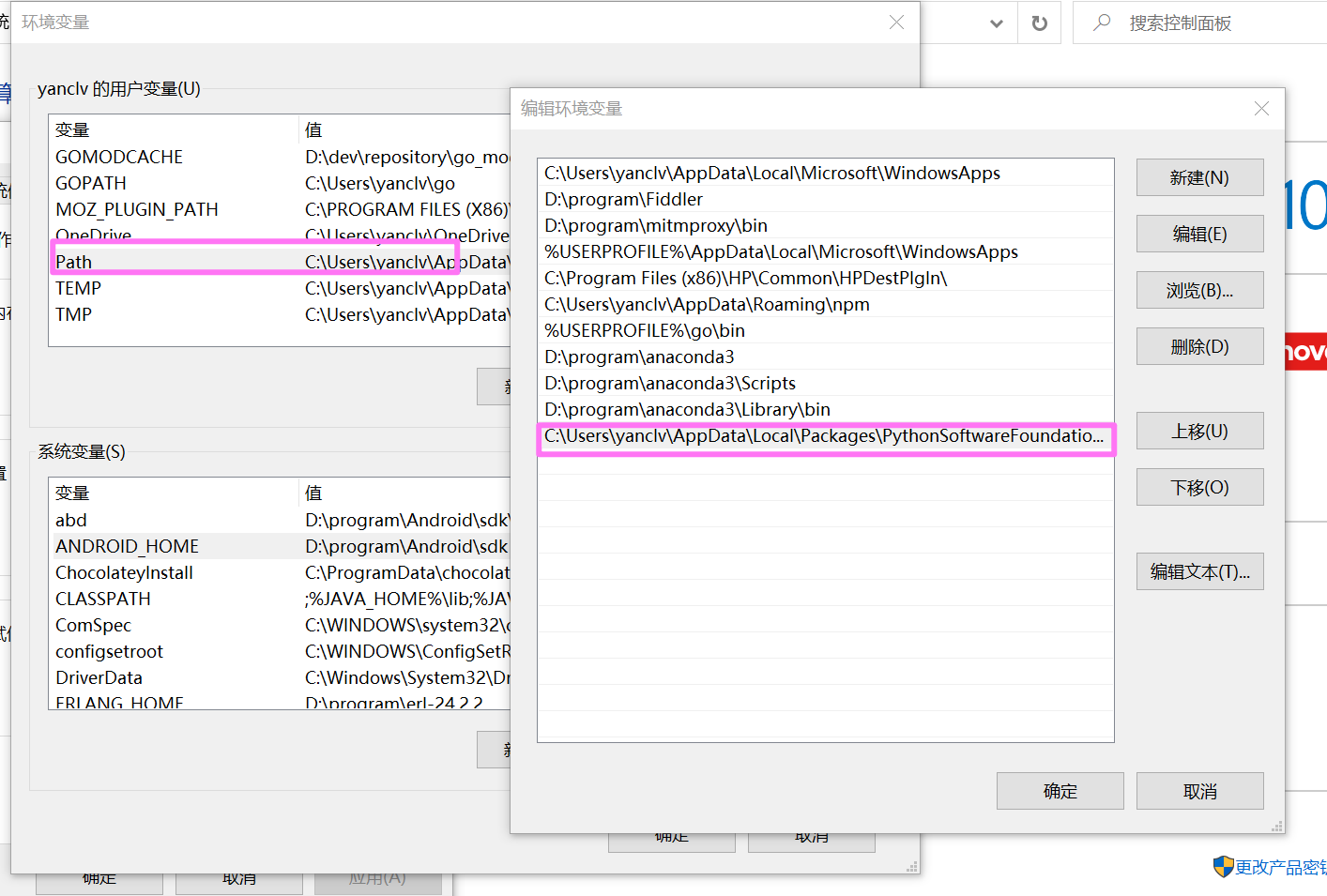
打开环境变量窗口,在 “用户变量” 部分,找到并选择 “path” 变量,然后点击 “编辑” 按钮。
-
在编辑环境变量窗口中,点击 “新建” 按钮,在弹出的对话框中输入poetry安装目录:%APPDATA%\Local\Packages\PythonSoftwareFoundation.Python.3.9_qbz5n2kfra8p0\LocalCache\local-packages\Python39\Scripts,然后点击 “确定”。
-
在 “环境变量” 窗口中,点击 “确定” 按钮应用更改。如下图所示:
测试
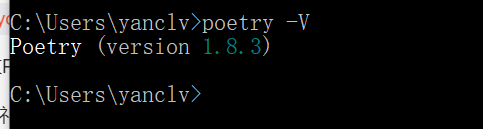
输入如下命令,返回显示poetry的版本,即安装成功:
在window系统中,打开powershell,输入命令后,显示如下:
其它系统类似。
**安装Auto-GPT **
截止当前2024年7月,最新的稳定发布版本是v0.5.1,我们使用该版本作为演示。
下载项目
一、git clone 方式下载
打开CMD命令行,输入:
1
|
git clone https://github.com/Significant-Gravitas/AutoGPT
|
完成后,可以看到当前文件夹已经下载了 Auto-GPT 的源代码。如果下载比较慢或常中断,建议直接下载源码包。
二、直接下载源码包
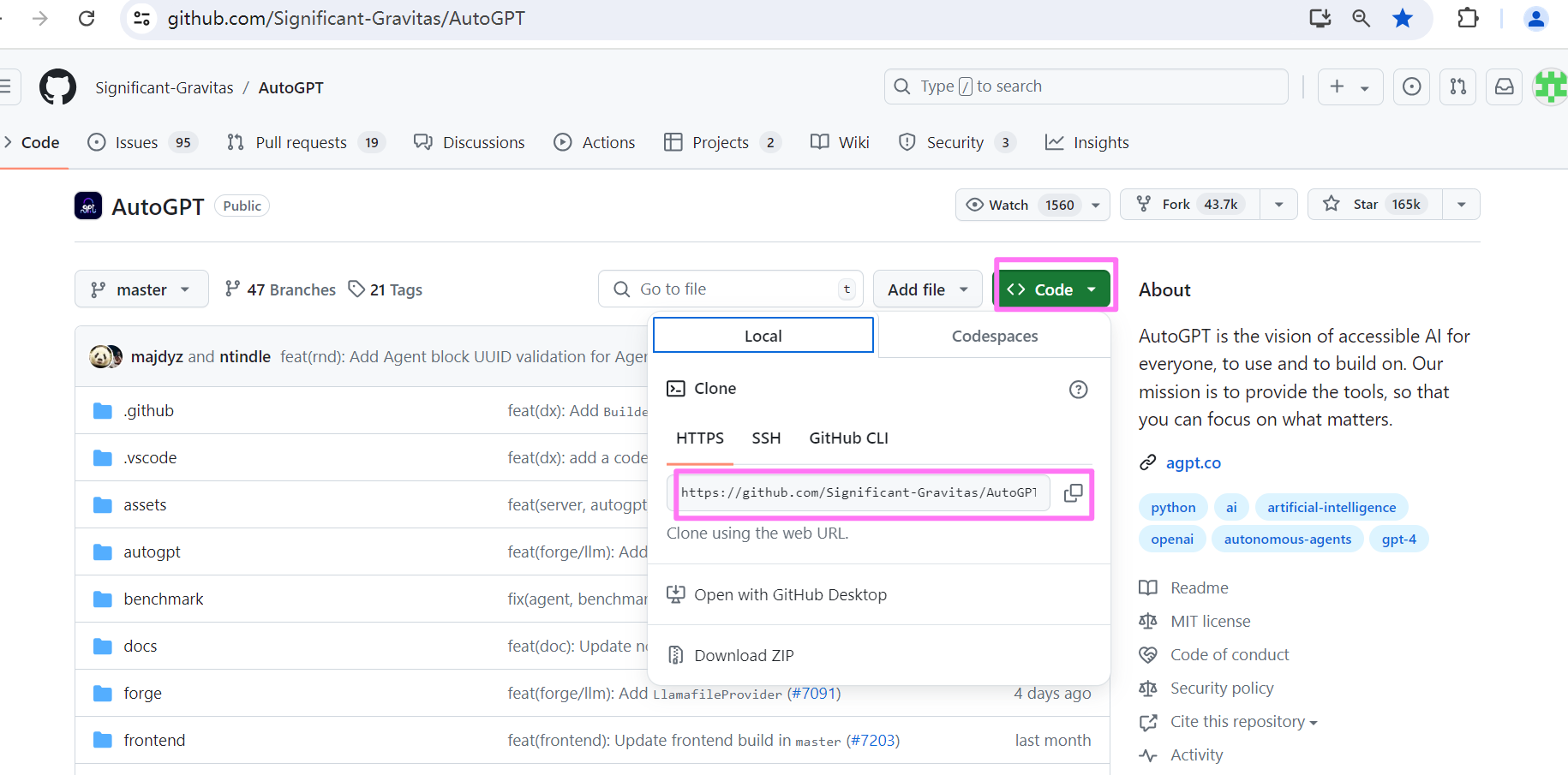
打开项目地址:https://github.com/Significant-Gravitas/AutoGPT,点击 Code,复制地址,如下图:
新建一个文件夹 autogpt,将下载的文件解压到该文件夹中。
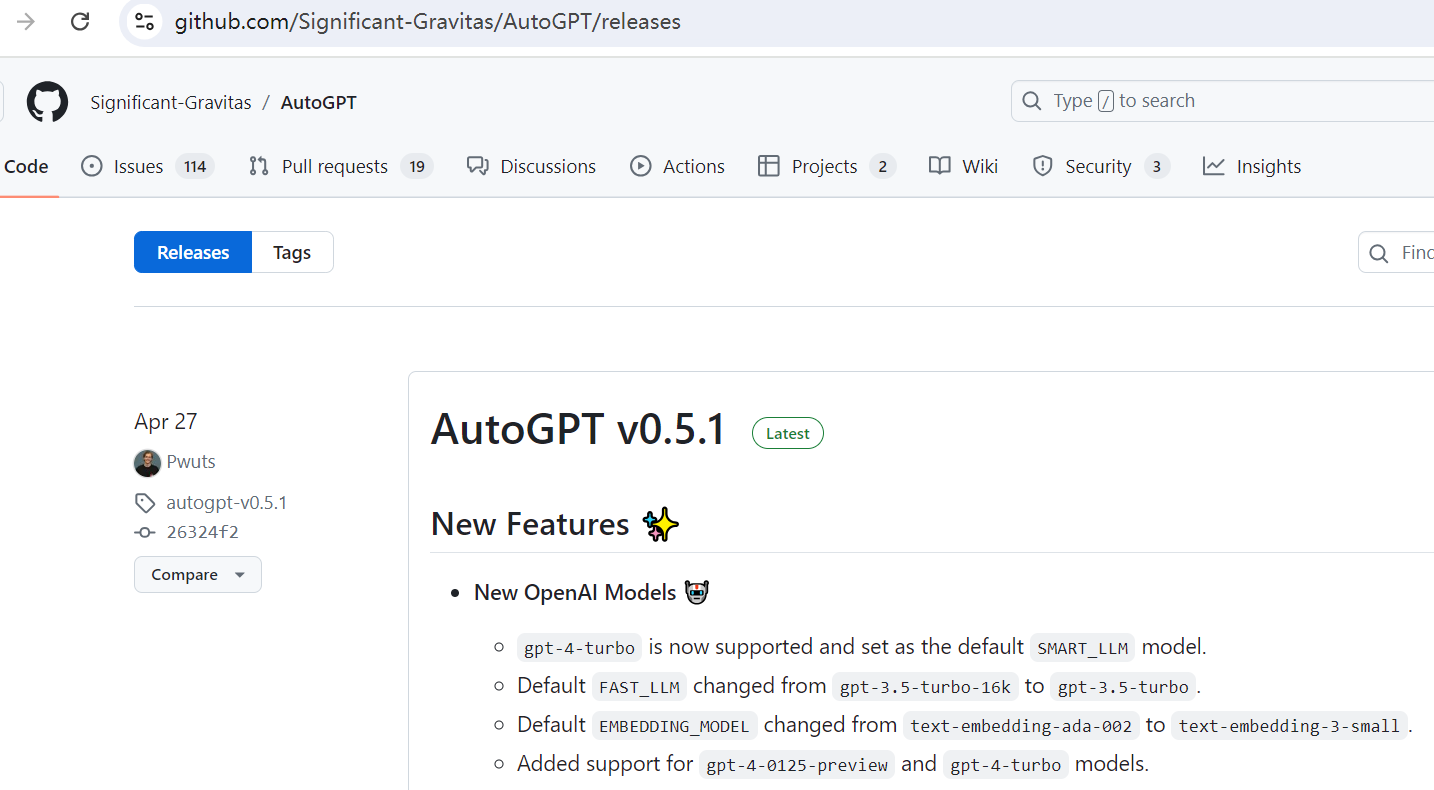
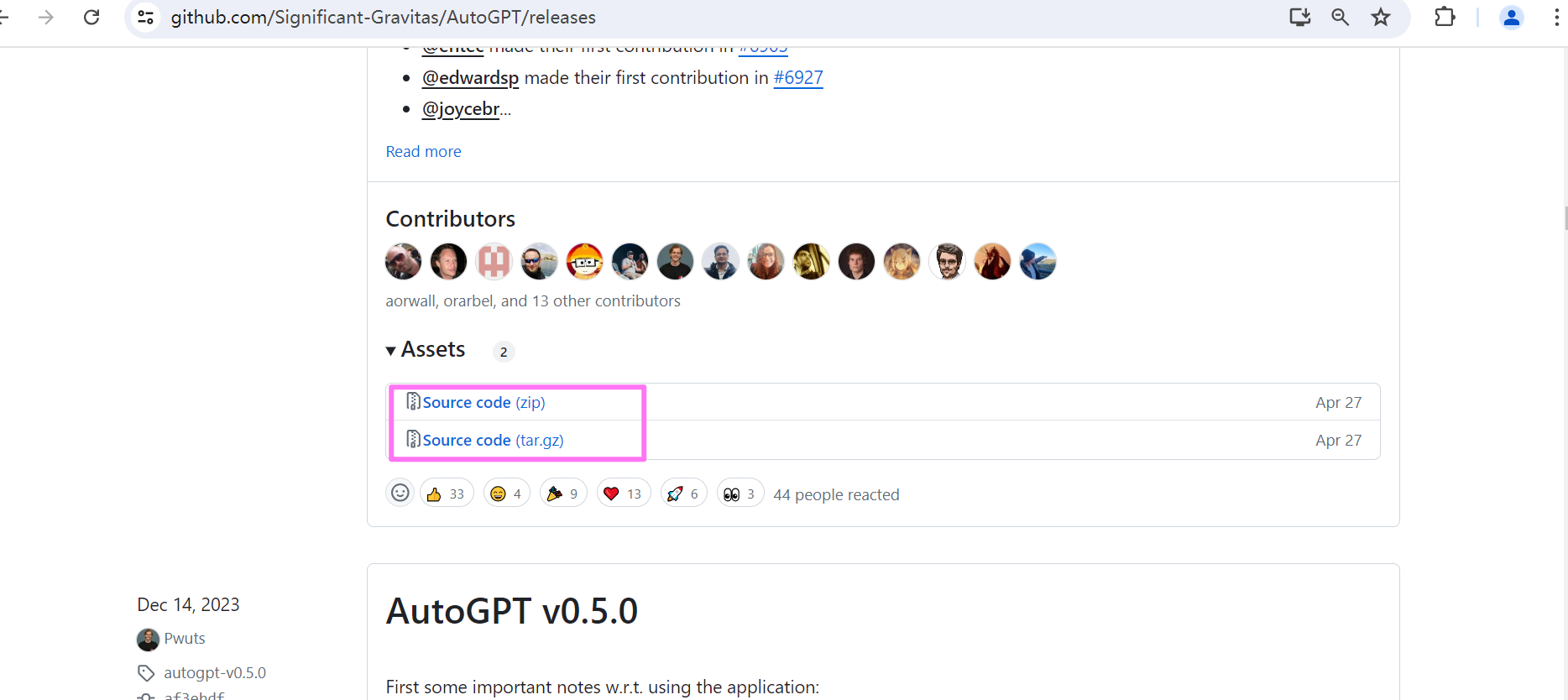
如果需要下载其它稳定版本,打开项目地址:https://github.com/Significant-Gravitas/AutoGPT/releases,拉到 Assets 处,点击源码压缩包下载。这里下载版本v0.5.1。
下载依赖
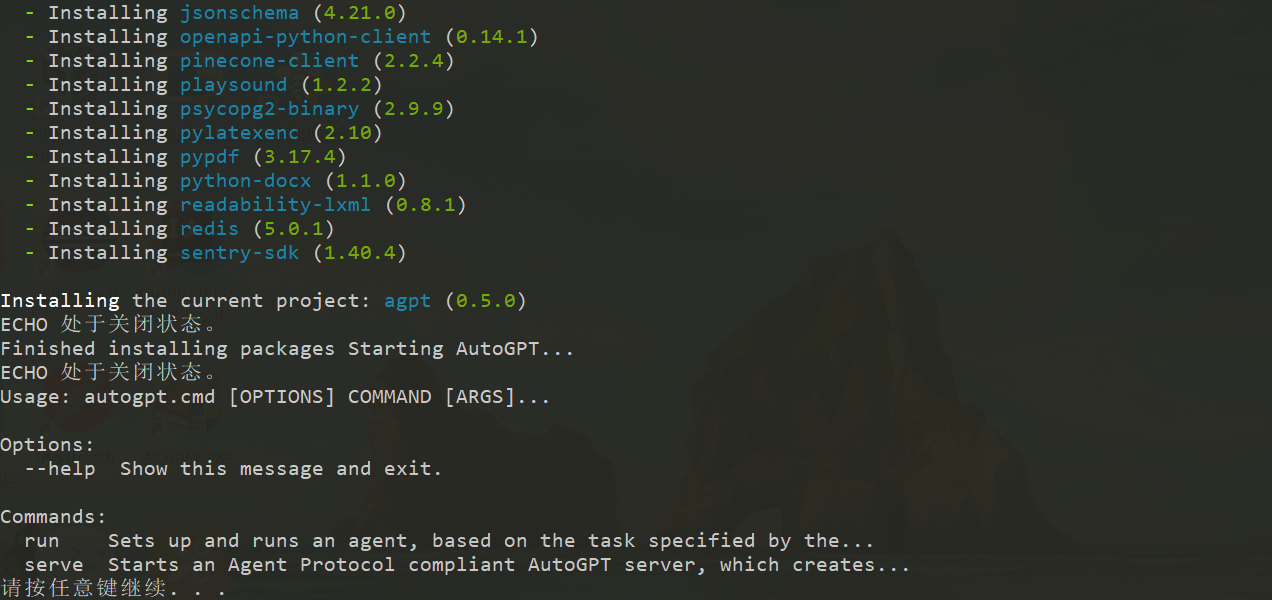
autoGPT 在0.5 版本后采用 poetry 进行包管理及打包。在进入autogpts\autogpt目录下,运行如下命令,安装所有必需的依赖项:
另外运行命令 :
也会自动检测依赖包并下载,运行该命令,依赖包下载完成后,可以看到如下的界面:
配置
打开 autogpt 源码文件夹,进入autogpt目录。
-
找到名为.env.template的文件,并将其命名为.env。注意:在某些操作系统中,点前缀的文件默认情况下可能被隐藏。 如果在命令提示符/终端窗口中,可以使用以下命令拷贝:
-
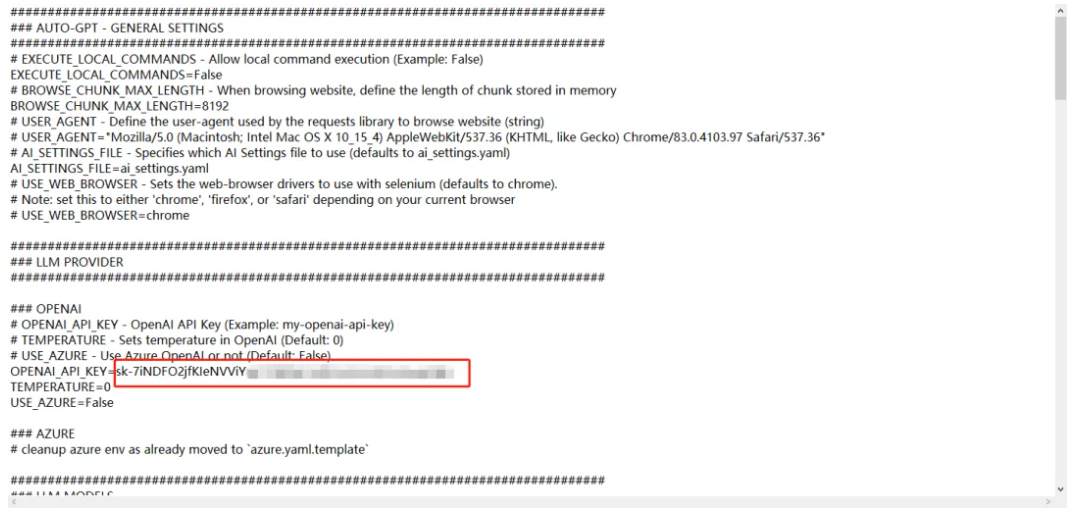
在文本编辑器中打开.env文件。配置访问openAl API 的 key(必须)。具体配置查看下文。
注意不需要用英文双引号包括:
调用openAI api 大概有四种方式:
-
直连:直接连接openAI官网 API。由于目前国内无法访问openAI官网,这种方式需要能科学上网。
-
转发url:通过转发服务连接openAI官网接口,比如Cloudflare提供的AI Gateway,转发到openAI http://api.openai.com,需要到 https://www.cloudflare-cn.com注册账号,目前这个服务是免费的。由于openAI官方从7月9日起停止对我们地区的api服务。所以这种方式稳定性还不好确定。
-
Azure openAI:在微软的Azure上部署OpenAI的大模型,提供和openAI官方一样的api服务,这种方式不用科学上网,企业可以走正规渠道,有想应的售后服务,推荐使用这种方式。
-
第三方:使用第三方搭建的中转服务,通常第三方会提供一个key和一个中转链接。这种方式不需要科学上网,稳定性不好确定,但比较方便,用于测试使用可以,正式环境推荐使用Azure openAI方式。(这种服务在百度上搜索下,应该会有很多)。
需要在.env 文件上找到 OPENAI_API_KEY,OPENAI_API_BASE_URL参数填入实际的值,配置如下所示:
1
2
|
OPENAI_API_KEY=your-openai-api-key  #替换为第三方提供的key
OPENAI_API_BASE_URL=https://api.xxx.com/v1  #替换为第三方提供的中转链接
|
-
其它的组件访问KEY(可选)
按需要配置其它组件的访问KEY,如google搜索KEY。
运行 auto-gpt
进入auto-gpt的程序目录下,%下载目录%\autogpts\autogpt, 打开powershell。
使用./autogpt.sh –help命令。会列出所有你可以使用的子命令和参数,若之前没有下载依赖,该命令检查并下载安装所需的依赖项。
在Windows上,使用autogpt.bat代替autogpt.sh。其它所有内容(子命令、参数)应该都是一样的。
1
2
3
4
5
6
7
8
9
|
$ ./autogpt.sh --help
Usage: python -m autogpt [OPTIONS] COMMAND [ARGS]...

Options:
  --help  Show this message and exit.

Commands:
  run    Sets up and runs an agent, based on the task specified by the...
  serve  Starts an Agent Protocol compliant AutoGPT server, which creates...
|
命令行模式
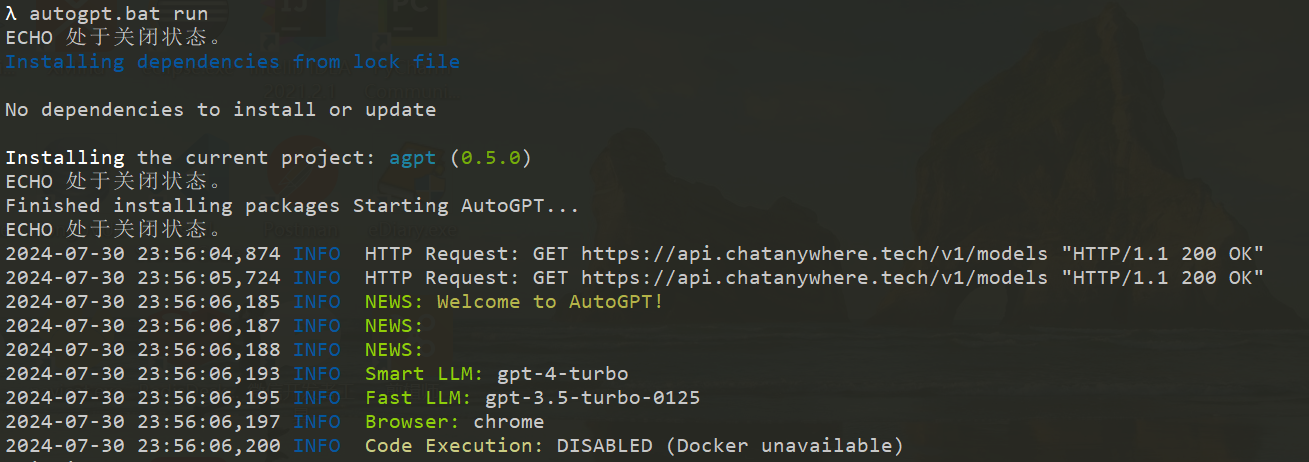
执行以下命令,使用命令行方式启动AutoGPT(window 中./autogpt.sh 改为 autogpt.bat ):
执行命令后,显示如下,表明启动了autoGPT:
开启调试功能,添加 –debug参数(window 中./autogpt.sh 改为 autogpt.bat ):
1
|
./autogpt.sh run --debug
|
Continuous 模式
运行无需用户授权,100%自动化。不建议使用连续模式。这会有潜在的危险,可能会导致你的agent永远运行或执行你通常不会授权的操作。
1
|
./autogpt.sh --continuous
|
按“Ctrl+C”退出程序。
运行流程
下面我们通过运行一个示例,来深入了解autoGPT的运行流程。
初始化Agent
在autoGPT自主地完成任务之前,首先需要初始化Agent。描述这个代理叫什么名字,它应该完成的目标是什么。在程序启动后,会提示用户输入希望AutoGPT执行的任务,如下所示:
1
2
|
2024-07-26 09:57:05,989 DEBUG  Asking user via keyboard...
Enter the task that you want AutoGPT to execute, with as much detail as possible:
|
输入任务"制作素食三明治食谱",系统会创建一个自主的agent来完成任务,创建Agent需要提供代理的名称、任务描述、最佳实践及约束的指令等信息,这些信息部分是通过发送给大模型来生成的,提供给大模型的提示词如下:
 1
 2
 3
 4
 5
 6
 7
 8
 9
10
11
12
13
14
15
16
17
18
19
20
21
22
23
24
25
26
27
28
29
30
31
|
SYSTEM: Your job is to respond to a user-defined task, given in triple quotes, by invoking the `create_agent` function to generate an autonomous agent to complete the task. You should supply a role-based name for the agent (_GPT), an informative description for what the agent does, and 1 to 5 directives in each of the categories Best Practices and Constraints, that are optimally aligned with the successful completion of its assigned task.
Example Input:
"""Help me with marketing my business"""
Example Call:
```
[
    {
        "type": "function",
        "function": {
            "name": "create_agent",
            "arguments": {
                "name": "CMOGPT",
                "description": "a professional digital marketer AI that assists Solopreneurs in growing their businesses by providing world-class expertise in solving marketing problems for SaaS, content products, agencies, and more.",
                "directives": {
                    "best_practices": [
                        "Engage in effective problem-solving, prioritization, planning, and supporting execution to address your marketing needs as your virtual Chief Marketing Officer.",
                        "Provide specific, actionable, and concise advice to help you make informed decisions without the use of platitudes or overly wordy explanations.",
                        "Identify and prioritize quick wins and cost-effective campaigns that maximize results with minimal time and budget investment.",
                        "Proactively take the lead in guiding you and offering suggestions when faced with unclear information or uncertainty to ensure your marketing strategy remains on track."
                    ],
                    "constraints": [
                        "Do not suggest illegal or unethical plans or strategies.",
                        "Take reasonable budgetary limits into account."
                    ]
                }
            }
        }
    }
]
```
USER: """制作素食三明治食谱"""
|
上述提示词大意是:“你的工作是响应用户定义的任务(以三引号表示),通过调用create_agent函数来生成一个自主的代理来完成该任务。你应该为代理提供一个基于角色的名称(_GPT),一个说明代理功能的信息性描述,以及在“最佳实践”和“约束”类别中各1至5条指令,这些指令与成功完成其分配的任务高度相关“。同时提供了期望输出应该是什么样的例子(Example 部分)。给任何生成式的大型语言模型举例子都非常有效。通过描述输出应该是什么样子,它更容易生成准确的答案。
将这个提示词发送给大模型,得到响应结果如下:
 1
 2
 3
 4
 5
 6
 7
 8
 9
10
11
12
13
14
15
16
|
role=<Role.ASSISTANT: 'assistant'> content=None tool_calls=[AssistantToolCall(id='call_EamkbLMEfUnz04fi788xwujM', type='function', function=AssistantFunctionCall(name='create_agent', arguments={
    'name': 'VeggieSandwichChef_GPT',
    'description': 'an AI dedicated to creating delicious and innovative vegetarian sandwich recipes, focusing on healthy ingredients and diverse flavors.',
    'directives': {
        'best_practices': [
        	'Always focus on a blend of nutritional balance and taste, incorporating a variety of vegetables, proteins, and grains.',
        	'Include clear, easy-to-follow instructions that cater to both novice and experienced cooks.',
        	'Ensure recipes can be adapted for vegan preferences whenever possible, providing suitable substitutions for dairy or other animal products.',
        	'Highlight the preparation time and serving size to help users in meal planning and preparation.'],
       'constraints': [
       		'Avoid using ingredients that are known allergens without offering alternatives.',
       		'Keep the recipes simple with ingredients that are easily accessible.',
       		'Do not include any meat, fish, or poultry products in the recipes.',
       		'Respect dietary restrictions by clearly indicating if a recipe contains common allergens like nuts, soy, or gluten.']
    }
} ))]
|
大模型为我们生产了agent的名称VeggieSandwichChef_GPT、描述、及最佳实践和约束各若干条指令。autoGPT可以利用这些信息结合默认模板配置来构建名为VeggieSandwichChef_GPT的agent。
构建初始Prompt
这是实现自主任务循环的第一步,创建触发大模型进行决策生成下一步动作的提示。
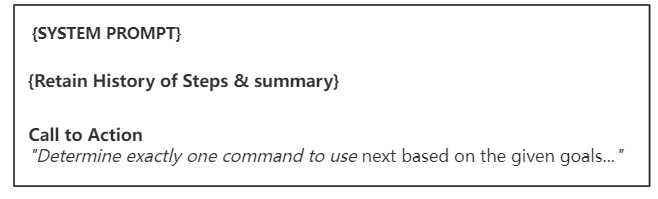
这一步提示词主要由三部分组成:
- 系统提示(SYSTEM PROMPT):为完成目标任务的完整背景信息,及应该遵循的指导。包含agent角色身份、描述、任务目标、约束条件、可利用的资源、可执行的命令列表和最佳实践指令、响应的格式。
- 历史步骤及总结(Retain History of Steps & summary):历史已执行步骤的列表,同时会对执行步骤进行总结,以提炼重要的事实信息,减少提示信息量。
- 号召行动(Call to Action):决定下一步执行的命令。
我们先来看下构建的完整提示词示例,再来了解每一项,示例如下:
 1
 2
 3
 4
 5
 6
 7
 8
 9
10
11
12
13
14
15
16
17
18
19
20
21
22
23
24
25
26
27
28
29
30
31
32
33
34
35
36
37
38
39
40
41
42
43
44
45
46
47
48
49
50
51
52
53
54
55
56
57
58
59
60
61
62
63
64
65
66
67
68
69
70
71
72
73
74
75
76
77
|
2024-07-26 09:58:04,794 DEBUG  Executing prompt:

============== ChatPrompt ==============
Length: 5 messages
----------------- SYSTEM -----------------
You are VeggieSandwichChef_GPT, an AI dedicated to creating delicious and innovative vegetarian sandwich recipes, focusing on healthy ingredients and diverse flavors.

Your decisions must always be made independently without seeking user assistance. Play to your strengths as an LLM and pursue simple strategies with no legal complications.

## Constraints
You operate within the following constraints:
1. Exclusively use the commands listed below.
2. You can only act proactively, and are unable to start background jobs or set up webhooks for yourself. Take this into account when planning your actions.
3. You are unable to interact with physical objects. If this is absolutely necessary to fulfill a task or objective or to complete a step, you must ask the user to do it for you. If the user refuses this, and there is no other way to achieve your goals, you must terminate to avoid wasting time and energy.
4. Avoid using ingredients that are known allergens without offering alternatives.
5. Keep the recipes simple with ingredients that are easily accessible.
6. Do not include any meat, fish, or poultry products in the recipes.
7. Respect dietary restrictions by clearly indicating if a recipe contains common allergens like nuts, soy, or gluten.

## Resources
You can leverage access to the following resources:
1. Internet access for searches and information gathering.
2. The ability to read and write files.
3. You are a Large Language Model, trained on millions of pages of text, including a lot of factual knowledge. Make use of this factual knowledge to avoid unnecessary gathering of information.

## Commands
These are the ONLY commands you can use. Any action you perform must be possible through one of these commands:
1. list_folder: List the items in a folder. Params: (folder: string)
2. open_file: Opens a file for editing or continued viewing; creates it if it does not exist yet. Note: If you only need to read or write a file once, use `write_to_file` instead.. Params: (file_path: string)
3. open_folder: Open a folder to keep track of its content. Params: (path: string)
4. read_file: Read an existing file. Params: (filename: string)
5. write_file: Write a file, creating it if necessary. If the file exists, it is overwritten.. Params: (filename: string, contents: string)
6. ask_user: If you need more details or information regarding the given goals, you can ask the user for input. Params: (question: string)
7. web_search: Searches the web. Params: (query: string)
8. read_webpage: Read a webpage, and extract specific information from it. You must specify either topics_of_interest, a question, or get_raw_content.. Params: (url: string, topics_of_interest?: Array<string>, question?: string, get_raw_content?: boolean)
9. finish: Use this to shut down once you have completed your task, or when there are insurmountable problems that make it impossible for you to finish your task.. Params: (reason: string)

## Best practices
1. Continuously review and analyze your actions to ensure you are performing to the best of your abilities.
2. Constructively self-criticize your big-picture behavior constantly.
3. Reflect on past decisions and strategies to refine your approach.
4. Every command has a cost, so be smart and efficient. Aim to complete tasks in the least number of steps.
5. Only make use of your information gathering abilities to find information that you don't yet have knowledge of.
6. Always focus on a blend of nutritional balance and taste, incorporating a variety of vegetables, proteins, and grains.
7. Include clear, easy-to-follow instructions that cater to both novice and experienced cooks.
8. Ensure recipes can be adapted for vegan preferences whenever possible, providing suitable substitutions for dairy or other animal products.
9. Highlight the preparation time and serving size to help users in meal planning and preparation.

## Your Task
The user will specify a task for you to execute, in triple quotes, in the next message. Your job is to complete the task while following your directives as given above, and terminate when your task is done.
------------------ USER ------------------
"""制作素食三明治食谱"""
----------------- SYSTEM -----------------
The current time and date is Fri Jul 26 09:58:04 2024
----------------- SYSTEM -----------------
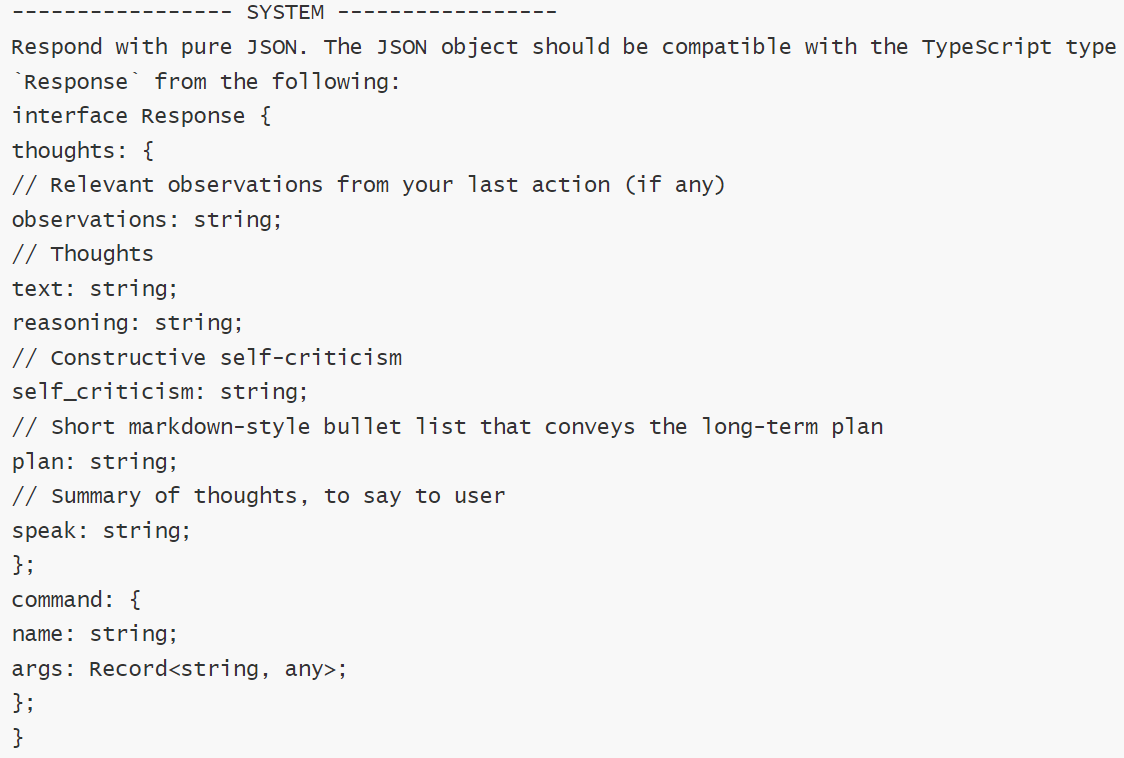
Respond with pure JSON. The JSON object should be compatible with the TypeScript type `Response` from the following:
interface Response {
thoughts: {
// Relevant observations from your last action (if any)
observations: string;
// Thoughts
text: string;
reasoning: string;
// Constructive self-criticism
self_criticism: string;
// Short markdown-style bullet list that conveys the long-term plan
plan: string;
// Summary of thoughts, to say to user
speak: string;
};
command: {
name: string;
args: Record<string, any>;
};
}
------------------ USER ------------------
Determine exactly one command to use next based on the given goals and the progress you have made so far, and respond using the JSON schema specified previously:
|
系统提示
系统提示给予大模型的上下文,应该遵循的指导信息。
主要包含以下几项内容:
可以看到要求的json格式,包含thoughts(思考)和comand (命令)两部分。
Thoughts中包含六个步骤:
- observations(观察):最后一个动作的执行结果(如果有的话)。
- Thoughts(思考):针对用户目标的回答,将要做什么。
- reasoning(推理):,是对回答的解释,告诉用户我为什么要这么做。
- self_criticism(自我批评):建设性的自我批评,标记出用户目标的核心点,以便在回答时能够抓住重点。
- plan(计划): 完成用户给定的目标的执行计划。
- speak(发言):总结想法,说给用户(是一个语言播放的功能,只有配置了语言播放功能才有效)。
这些步骤实际上是扩展了 Reason and ACT(ReACT)框架的提示格式,通过让模型模拟广泛的推理,观察、自我批评与直接回答问题相比,它往往会给出更准确的答案。
Comand 指定下一步需要执行的动作:
包含待执行的命令及响应的参数,name是命令的名称,args 列出命令的参数。
历史步骤及总结
这里列出历史每一步执行的行动及响应结果信息。由于这是第一步,所以之前没有历史步骤信息,当再一次循环时,会添加到提示词中的“##progress“部分。
确定下一步执行命令
指示大模型需要根据给定的目标,确定下一步要使用的命令,并按指定的JSON格式响应。
1
|
[{"role": "user", "content": "Determine exactly one command to use next based on the given goals and the progress you have made so far, and respond using the JSON schema specified previously" }]
|
决策下一步的行动
在前一步中定义的提示符发送给大模型,大模型进行思考推理,决策出要采取的操作,返回响应结果如下:
1
2
3
4
5
6
7
8
9
10
11
12
13
14
15
16
17
18
19
20
|
2024-07-26 09:58:37,367 DEBUG LLM response content:
{
"thoughts": {
"observations": "The task is to create a vegetarian sandwich recipe.",
"text": "To begin recipe development, I need to define the core ingredients and structure of the sandwich. This includes selecting a bread type, the main protein source (e.g., tofu, beans), vegetables, and condiments that harmonize well.",
"reasoning": "A systematic approach to crafting a well-balanced and appealing vegetarian sandwich involves brainstorming potential ingredients and their combinations. This forms the baseline before I can write and present a complete recipe.",
"self_criticism": "I initially considered searching the web for existing vegetarian sandwich recipes for inspiration but realized it may lead to standard ideas. Instead, creating something unique might be more beneficial and in line with the user's expectations.",
"plan": "- List potential ingredients for a vegetarian sandwich
- Select a combination that ensures nutritional balance and taste
- Write the recipe with clear instructions and indicate allergens
- Provide the completed recipe to the user",
"speak": "Let's start by brainstorming some exciting and nutritious ingredients for our vegetarian sandwich recipe!" 译“让我们开始集思广益一些令人兴奋和营养的食材,为我们的素食三明治食谱!”
},
"command": {
"name": "web_search",
"args": {
"query": "popular vegetarian sandwich ingredients" 译“受欢迎的素食三明治配料”
}
}
}
|
从响应看出,大模型按提示词要求遵循六个步骤的思考过程,更加精准的决策,生成下一步的行动计划,这里下一步执行的命令是web_search,参数是"popular vegetarian sandwich ingredients" 译“受欢迎的素食三明治配料”。
执行行动
接下来就需要执行命令,命令是一段逻辑处理函数。在autoGPT中默认集成些命令,如互联网搜索,默认是调用谷歌或duckduckgo_search搜索引擎获取搜索结果,并对结果进行解析处理成文本内容。您也可以根据需要进行扩展。
这里程序下一步执行的命令是web_search, 在执行命令之前询问用户授权操作,如下所示:
1
2
3
4
5
|
2024-07-26 10:01:24,205 INFO NEXT ACTION: COMMAND = web_search ARGUMENTS = {'query': 'popular vegetarian sandwich ingredients'}
2024-07-26 10:01:24,206 INFO Enter 'y' to authorise command, 'y -N' to run N continuous commands, 'n' to exit program, or enter feedback for VeggieSandwichChef_GPT...
2024-07-26 10:01:24,206 DEBUG Asking user via keyboard...
Input: y
2024-07-26 10:01:39,318 INFO -=-=-=-=-=-=-= COMMAND AUTHORISED BY USER -=-=-=-=-=-=-=
|
这里执行需要你的授权确认,输入"y"表示授权确认继续,输入"y -10“ 表示后续10个都确认,输入"y -N"表示直至结束都确认。这里输入Y回车,继续执行命令,输出执行结果如下:
1
2
3
4
5
6
7
8
9
|
2024-07-26 10:01:54,733 DEBUG PROCESSING:
SYSTEM: The user is going to give you a text enclosed in triple quotes. The text represents an action, the reason for its execution, and its result. Condense the action taken and its result into one line. Preserve any specific factual information gathered by the action.
USER: """Executed `web_search(query='popular vegetarian sandwich ingredients')`
- **Reasoning:** "Considering the lack of specific user preferences, designing a versatile vegetarian sandwich recipe will cater to potentially broad tastes and preferences. This would include elements like vegetables, protein, and suitable spreads to ensure the sandwich is nutritious and delicious."
- **Status:** `error`
- **Reason:** https://duckduckgo.com RequestsError: Failed to perform, curl: (28) Connection timed out after 10001 milliseconds. See https://curl.se/libcurl/c/libcurl-errors.html first for more details.
- **Error:** CommandExecutionError('https://duckduckgo.com RequestsError: Failed to perform, curl: (28) Connection timed out after 10001 milliseconds. See https://curl.se/libcurl/c/libcurl-errors.html first for more details.')
"""
|
autoGPT默认的搜索操作是访问dockdockgo.com网站获取结果,由于国内无法访问该网站,所以这里执行失败。这个可以通过扩展搜索插件,使用bing或其它的搜索引擎解决。
保存行动结果
autoGPT会将执行的步骤及结果信息保存下来,在下一轮循环中会追加这些信息作为上下文发送给大模型,以便大模型知道已经执行的动作,从而更好的判断接下来要执行的动作,同时也避免重复执行相同的命令。
生成总结
autoGPT同时还会将执行动作的步骤及结果信息,发送给大模型,来生成摘要。将执行的行动及其结果信息进行总结摘要,保留行动过程中收集到的任何具体事实信息。这个摘要在后续的循环中使用,查看代码看到,在下一次循环时,会添加之前的执行步骤信息,前4个步骤使用完整的格式来描述,后面则使用摘要来描述.
这样做的目的,一方面可以压缩提示词内容,减少存储空间及TOKEN的使用量;另一方还可以通过大模型过滤无关紧要的信息,保留跟当前目标相关的信息。
调用大模型,生成总结summary信息如下:
1
2
3
|
---------------- SUMMARY -----------------
Attempted web search for popular vegetarian sandwich ingredients but encountered a connection timeout error from DuckDuckGo.
------------------------------------------
|
至此完成一轮的交互,重新进入下一轮的循环,直到遇到"finish"命令,来结束整个对话流程。
构建第二轮Prompt
新一轮循环开始,这一步的提示词,跟第一步相比,多增加了前面执行的步骤信息,放在"## Progress"部分,提示词如下:
1
2
3
4
5
6
7
8
9
10
11
12
13
14
15
16
17
18
19
20
21
22
23
24
25
26
27
28
29
30
31
32
33
34
35
36
37
38
39
40
41
42
43
44
45
46
47
48
49
50
51
52
53
54
55
56
57
58
59
60
61
62
63
64
65
66
67
68
69
70
71
72
73
74
75
76
77
78
79
80
81
82
83
84
85
86
|
2024-07-26 10:02:11,818 DEBUG Executing prompt:
============== ChatPrompt ==============
Length: 6 messages
----------------- SYSTEM -----------------
You are VeggieSandwichChef_GPT, an AI dedicated to creating delicious and innovative vegetarian sandwich recipes, focusing on healthy ingredients and diverse flavors.
Your decisions must always be made independently without seeking user assistance. Play to your strengths as an LLM and pursue simple strategies with no legal complications.
## Constraints
You operate within the following constraints:
1. Exclusively use the commands listed below.
2. You can only act proactively, and are unable to start background jobs or set up webhooks for yourself. Take this into account when planning your actions.
3. You are unable to interact with physical objects. If this is absolutely necessary to fulfill a task or objective or to complete a step, you must ask the user to do it for you. If the user refuses this, and there is no other way to achieve your goals, you must terminate to avoid wasting time and energy.
4. Avoid using ingredients that are known allergens without offering alternatives.
5. Keep the recipes simple with ingredients that are easily accessible.
6. Do not include any meat, fish, or poultry products in the recipes.
7. Respect dietary restrictions by clearly indicating if a recipe contains common allergens like nuts, soy, or gluten.
## Resources
You can leverage access to the following resources:
1. Internet access for searches and information gathering.
2. The ability to read and write files.
3. You are a Large Language Model, trained on millions of pages of text, including a lot of factual knowledge. Make use of this factual knowledge to avoid unnecessary gathering of information.
## Commands
These are the ONLY commands you can use. Any action you perform must be possible through one of these commands:
1. list_folder: List the items in a folder. Params: (folder: string)
2. open_file: Opens a file for editing or continued viewing; creates it if it does not exist yet. Note: If you only need to read or write a file once, use `write_to_file` instead.. Params: (file_path: string)
3. open_folder: Open a folder to keep track of its content. Params: (path: string)
4. read_file: Read an existing file. Params: (filename: string)
5. write_file: Write a file, creating it if necessary. If the file exists, it is overwritten.. Params: (filename: string, contents: string)
6. ask_user: If you need more details or information regarding the given goals, you can ask the user for input. Params: (question: string)
7. web_search: Searches the web. Params: (query: string)
8. read_webpage: Read a webpage, and extract specific information from it. You must specify either topics_of_interest, a question, or get_raw_content.. Params: (url: string, topics_of_interest?: Array<string>, question?: string, get_raw_content?: boolean)
9. finish: Use this to shut down once you have completed your task, or when there are insurmountable problems that make it impossible for you to finish your task.. Params: (reason: string)
## Best practices
1. Continuously review and analyze your actions to ensure you are performing to the best of your abilities.
2. Constructively self-criticize your big-picture behavior constantly.
3. Reflect on past decisions and strategies to refine your approach.
4. Every command has a cost, so be smart and efficient. Aim to complete tasks in the least number of steps.
5. Only make use of your information gathering abilities to find information that you don't yet have knowledge of.
6. Always focus on a blend of nutritional balance and taste, incorporating a variety of vegetables, proteins, and grains.
7. Include clear, easy-to-follow instructions that cater to both novice and experienced cooks.
8. Ensure recipes can be adapted for vegan preferences whenever possible, providing suitable substitutions for dairy or other animal products.
9. Highlight the preparation time and serving size to help users in meal planning and preparation.
## Your Task
The user will specify a task for you to execute, in triple quotes, in the next message. Your job is to complete the task while following your directives as given above, and terminate when your task is done.
------------------ USER ------------------
"""制作素食三明治食谱"""
----------------- SYSTEM -----------------
## Progress
* Step 1: Executed `web_search(query='popular vegetarian sandwich ingredients')`
- **Reasoning:** "Considering the lack of specific user preferences, designing a versatile vegetarian sandwich recipe will cater to potentially broad tastes and preferences. This would include elements like vegetables, protein, and suitable spreads to ensure the sandwich is nutritious and delicious."
- **Status:** `error`
- **Reason:** https://duckduckgo.com RequestsError: Failed to perform, curl: (28) Connection timed out after 10001 milliseconds. See https://curl.se/libcurl/c/libcurl-errors.html first for more details.
- **Error:** CommandExecutionError('https://duckduckgo.com RequestsError: Failed to perform, curl: (28) Connection timed out after 10001 milliseconds. See https://curl.se/libcurl/c/libcurl-errors.html first for more details.')
----------------- SYSTEM -----------------
The current time and date is Fri Jul 26 10:02:11 2024
----------------- SYSTEM -----------------
Respond with pure JSON. The JSON object should be compatible with the TypeScript type `Response` from the following:
interface Response {
thoughts: {
// Relevant observations from your last action (if any)
observations: string;
// Thoughts
text: string;
reasoning: string;
// Constructive self-criticism
self_criticism: string;
// Short markdown-style bullet list that conveys the long-term plan
plan: string;
// Summary of thoughts, to say to user
speak: string;
};
command: {
name: string;
args: Record<string, any>;
};
}
------------------ USER ------------------
Determine exactly one command to use next based on the given goals and the progress you have made so far, and respond using the JSON schema specified previously:
==========================================
|
可以看到,上面的提示词中,追加了之前执行的步骤信息,放在了“## Progress”下面。
重新进入下一轮的循环,不断迭代,逐步朝着完成目标的方向前进,直到程序中断或模型认为已经完成了目标,返回下一步执行的命令是"finish", 来结束整个对话流程。
源码解析
这里使用截止当前2024年7月最新的autoGPT版本 V0.5.1 代码进行解析。
代码结构
该版本AutoGPT项目由四个主要部分组成:
- The Agent : AutoGPT的核心,一个由llm提供支持的半自主代理,为你执行任何任务。
- The Benchmark : 基准测试,agbenchmark` 可以与任何支持代理协议的代理一起使用。进行自主、客观的性能评估,确保您的代理已准备好在现实世界中执行任务。
- The Forge :打造自己的代理, Forge提供了创建你定制代理应用程序的现成模板。
- The Frontend 代理的前端交互UI。
另外为了将这些联系在一起,在项目的根目录中添加了一个CLI命令,使得非常方便的使用以上组件。如安装依赖只需要执行命令:
这里针对AutoGPT的核心代码进行解析。该部分代码在 “%下载根目录%\autogpts\autogpt\autogpt”中。
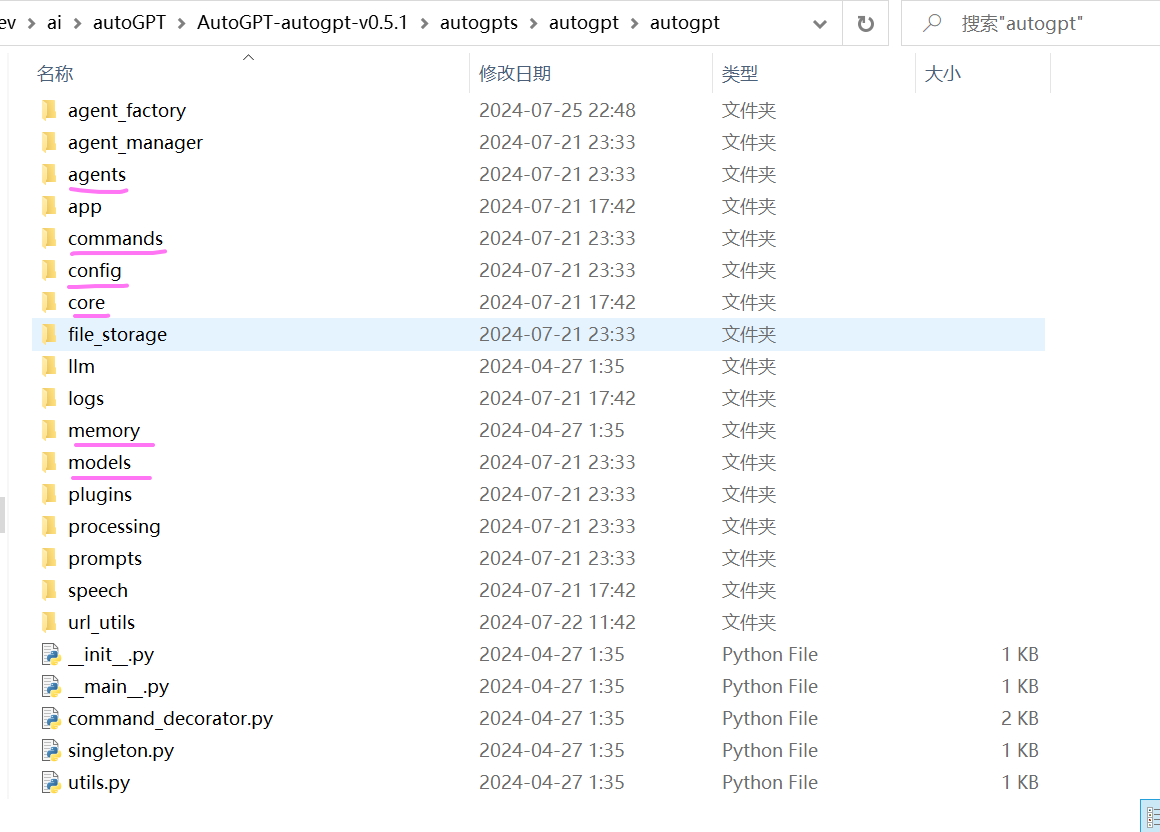
从代码组织结构,主要包含以下几个模块:
- agents :配置及创建Agent,以及Agent 的执行如调用大模型推理、执行行动命令、解析结果、保存历史行动步骤等的核心逻辑。
- app:控制整个Auto-GPT的核心运行流程,将各个模块串联在一起完成用户的目标。
- comands:集成可执行的命令工具列表。如读写文件、网页搜索等等。
- config:全局环境的配置和agent任务相关的配置,全局环境配置对应的是.env文件中的配置,读取配置文件prompt_settings.yaml、ai_settings.yaml、azure.yaml、plugins_config.yaml的配置。
- core:公共基础类,如基础基类定义等。调用openAI的聊天交互请求处理其实写在该模块中。位置在:/core/resource/model_providers/openai.py
- llm:调用大模型接口参数定义及交互的一些处理。
- memory:历史交互记录的缓存处理,在该版本中只保留了JSON文件的方式来保存历史行动记录。不在支持pinecone、redis、weaviate、milvus等存储服务。
- prompt:默认提示词的配置及格式处理。
代码执行流程
命令行的执行入口在 autogpt/app/cli.py 文件中
 1
 2
 3
 4
 5
 6
 7
 8
 9
10
11
12
13
14
15
16
17
18
19
20
21
|
def run(
continuous: bool,
continuous_limit: Optional[int],
speak: bool,
gpt3only: bool,
gpt4only: bool,
//...省略
) -> None:
"""
根据用户指定的任务设置并运行agent,或者恢复执行之前存在的agent。
"""
# 将import放在函数内部,以避免在启动CLI时导入所有内容
from autogpt.app.main import run_auto_gpt
run_auto_gpt(
continuous=continuous,
continuous_limit=continuous_limit,
ai_settings=ai_settings,
prompt_settings=prompt_settings,
//...省略
)
|
初始化并创建agent
进入run_auto_gpt 方法,在autogpt/app/main.py文件下。
1
2
3
4
5
6
7
8
9
10
11
12
13
14
15
16
17
18
19
20
21
22
23
24
25
26
27
28
29
30
31
32
33
34
35
36
37
38
39
40
41
42
43
44
45
46
47
48
49
50
51
52
53
54
55
56
57
58
59
60
61
62
63
64
65
66
67
68
69
70
71
72
73
74
75
76
77
78
79
80
81
82
83
84
85
86
87
88
89
90
91
92
93
94
95
96
97
98
99
100
101
102
103
104
105
106
107
108
109
110
111
112
113
114
115
116
117
118
119
120
121
122
123
124
|
async def run_auto_gpt(
continuous: bool = False,
continuous_limit: Optional[int] = None,
//...省略
):
# 设置配置,从配置文件.env,ai_settings.yaml、azure.yaml、plugins_config.yaml
# prompt_settings.yaml中读取.
config = ConfigBuilder.build_config_from_env()
#配置数据存储的方式,默认为本地文件保存,其它配置选项为GCS(google云存储)、S3(亚马逊 #云存储)
local = config.file_storage_backend == FileStorageBackendName.LOCAL
restrict_to_root = not local or config.restrict_to_workspace
file_storage = get_storage(
config.file_storage_backend, root_path="data", restrict_to_root=restrict_to_root
)
file_storage.initialize()
//...省略部分,检查openAI key、根据函数的传参覆盖默认配置
//实例化llm提供者,封装与LLM的接口调用。
llm_provider = _configure_openai_provider(config)
//...省略部分,初始化日志处理器,配置插件等
# 列出已存在的代理列表,让用户选择要运行的代理
agent_manager = AgentManager(file_storage)
existing_agents = agent_manager.list_agents()
load_existing_agent = ""
if existing_agents:
print(
"Existing agents\n---------------\n"
+ "\n".join(f"{i} - {id}" for i, id in enumerate(existing_agents, 1))
)
load_existing_agent = clean_input(
config,
"Enter the number or name of the agent to run,"
" or hit enter to create a new one:",
)
//...省略
//若用户有选择之前的代理,则询问用户是否恢复该代理,默认或回复“y”则恢复代理状态,并根据该状态创建代理。
if load_existing_agent:
agent_state = None
while True:
answer = clean_input(config, "Resume? [Y/n]")
if answer == "" or answer.lower() == "y":
agent_state = agent_manager.load_agent_state(load_existing_agent)
break
elif answer.lower() == "n":
break
if agent_state:
//根据之前的代理状态创建代理
agent = configure_agent_with_state(
state=agent_state,
app_config=config,
file_storage=file_storage,
llm_provider=llm_provider,
)
//检查agent的最后执行命令如果是finish,表明之前的已经完成,则询问用户给出一个后续问题或任务。
if (
agent.event_history.current_episode
and agent.event_history.current_episode.action.name == finish.__name__
and not agent.event_history.current_episode.result
):
finish_reason = agent.event_history.current_episode.action.args["reason"]
print(f"Agent previously self-terminated; reason: '{finish_reason}'")
new_assignment = clean_input(
config, "Please give a follow-up question or assignment:"
)
//没有已存在的代理或用户没有选择已存在的代理,则要求用户输入一个任务,尽可能详细描述。
if not agent:
task = ""
while task.strip() == "":
task = clean_input(
config,
"Enter the task that you want AutoGPT to execute,"
" with as much detail as possible:",
)
//加载默认的指令模板数据,从prompt_settings.yaml文件中提取
base_ai_directives = AIDirectives.from_file(config.prompt_settings_file)
//同时请求大模型根据任务生成角色名称(_GPT),描述,以及在“最佳实践”和“约束”类别中各1至5 //条指令,这些指令与完成任务高度相关。
ai_profile, task_oriented_ai_directives = await generate_agent_profile_for_task(
task,
app_config=config,
llm_provider=llm_provider,
)
//整合基础模板数据和大模型生成的数据,构建提示词
ai_directives = base_ai_directives + task_oriented_ai_directives
//...省略部分
//创建代理
agent = create_agent(
agent_id=agent_manager.generate_id(ai_profile.ai_name),
task=task,
ai_profile=ai_profile,
directives=ai_directives,
app_config=config,
file_storage=file_storage,
llm_provider=llm_provider,
)
#################
# 运行代理主流程 #
#################
try:
await run_interaction_loop(agent)
except AgentTerminated:
//中断或结束时,保存代理状态,可用户指定代理ID
agent_id = agent.state.agent_id
logger.info(f"Saving state of {agent_id}...")
# Allow user to Save As other ID
save_as_id = clean_input(
config,
f"Press enter to save as '{agent_id}',"
" or enter a different ID to save to:",
)
await agent.save_state(save_as_id if not save_as_id.isspace() else None)
|
运行代理主流程
上一步进入run_interaction_loop方法,该方法同样位于 autogpt/app/main.py 文件中,这个是控制执行的主流程,运行代理的交互循环。
1
2
3
4
5
6
7
8
9
10
11
12
13
14
15
16
17
18
19
20
21
22
23
24
25
26
27
28
29
30
31
32
33
34
35
36
37
38
39
40
41
42
43
44
45
46
47
48
49
50
51
52
53
54
55
56
57
58
59
60
61
62
63
64
65
66
67
68
69
70
71
72
73
74
75
76
77
78
|
#运行代理的主交互循环,传入参数agent
async def run_interaction_loop(
agent: "Agent",
) -> None:
//...省略部分,加载代理配置参数、设置日志处理器、设置中断信号处理等代码
#########################
# 应用程序主循环 #
#########################
#continuous_mode/continuous_limit配置默认的循环次数,同时询问用户授权交互中,用户可指定继续循环 #的次数(回复'y':当前继续循环(即cycles_remaining+1),回复‘y -n’:后面n次继续循环,回复"n"退出程 #序),cycle_budget:为自动继续循环执行的次数,remaining:剩下循环的次数
while cycles_remaining > 0:
logger.debug(f"Cycle budget: {cycle_budget}; remaining: {cycles_remaining}")
handle_stop_signal()
############
# 让代理(内部是调用大模型进行推理决策)决定下一步要采取的行动。返回下一步执行命令
###########
with spinner:
try:
(
command_name,
command_args,
assistant_reply_dict,
) = await agent.propose_action()
except InvalidAgentResponseError as e:
//记录连续的失败的次数,若超过3次,则退出
logger.warning(f"The agent's thoughts could not be parsed: {e}")
consecutive_failures += 1
if consecutive_failures >= 3:
logger.error(
"The agent failed to output valid thoughts"
f" {consecutive_failures} times in a row. Terminating..."
)
raise AgentTerminated(
"The agent failed to output valid thoughts"
f" {consecutive_failures} times in a row."
)
continue
#重置连续的失败的次数
consecutive_failures = 0
###############
# 打印agent的想法和下一步执行的命令 #
###############
update_user(
ai_profile,
command_name,
command_args,
//...
)
handle_stop_signal()
//若当前继续循环次数为1时,需要征询用户的授权指令,输入'y'表示授权执行,'y -N'表示连续运行N个命 //令,' N'表示退出程序,或输入反馈建议.
if cycles_remaining == 1: # Last cycle
user_feedback, user_input, new_cycles_remaining = await get_user_feedback(
legacy_config,
ai_profile,
)
//...省略部分代码
###################
# 执行命令#
###################
if command_name:
//代理执行命令,打印执行的结果
result = await agent.execute(command_name, command_args, user_input)
if result.status == "success":
logger.info(
result, extra={"title": "SYSTEM:", "title_color": Fore.YELLOW}
)
elif result.status == "error":
logger.warning(
f"Command {command_name} returned an error: "
f"{result.error or result.reason}"
)
|
这里是核心部分,主控制流程,不断循环迭代代理的执行,主要包括以下两个操作:
-
agent.propose_action()
代理调用大模型进行推理决策,决定下一步要采取的行动。返回下一步执行命令名称及参数。
-
agent.execute(command_name, command_args, user_input)
代理执行命令,返回命令的执行结果。
接下来我们来看这两个方法的逻辑。
决策下一步的行动
进入agent.propose_action() 方法 ,位于autogpt/agents/features/watchdog.py 文件中。
1
2
3
4
5
6
7
8
9
10
11
12
13
14
15
16
17
18
19
20
21
22
23
24
25
26
27
28
29
30
31
32
33
34
35
36
37
38
39
40
41
42
43
44
45
46
47
|
async def propose_action(self, *args, **kwargs) -> BaseAgent.ThoughtProcessOutput:
########
#调用大模型进行推理决策,生成下一步要采取的行动,获取响应的命令名称、参数、思考推理过程。
########
command_name, command_args, thoughts = await super(
WatchdogMixin, self
).propose_action(*args, **kwargs)
#若没有禁用混合模式(即big_brain为false),则判断是否配置的fast_llm 与 smart_llm大模型不一 #致,若不一致,且上一步大模型响应结果中没有生成下一步的执行命令或执行命令与前一次调用的一样,则使 #用SMART_LLM模型重新推理。
if not self.config.big_brain and self.config.fast_llm != self.config.smart_llm:
previous_command, previous_command_args = None, None
if len(self.event_history) > 1:
# Detect repetitive commands
previous_cycle = self.event_history.episodes[
self.event_history.cursor - 1
]
previous_command = previous_cycle.action.name
previous_command_args = previous_cycle.action.args
rethink_reason = ""
if not command_name:
rethink_reason = "AI did not specify a command"
elif (
command_name == previous_command
and command_args == previous_command_args
):
rethink_reason = f"Repititive command detected ({command_name})"
if rethink_reason:
logger.info(f"{rethink_reason}, re-thinking with SMART_LLM...")
with ExitStack() as stack:
@stack.callback
def restore_state() -> None:
# Executed after exiting the ExitStack context
self.config.big_brain = False
# Remove partial record of current cycle
self.event_history.rewind()
# Switch to SMART_LLM and re-think
self.big_brain = True
return await self.propose_action(*args, **kwargs)
return command_name, command_args, thoughts
|
这一步的核心是调用大模型进行推理决策,生成下一步要采取的行动,获取响应的命令名称、参数、思考推理过程。内部调用方法:super(WatchdogMixin, self ).propose_action(*args, **kwargs) ,该方法在
autogpt/agents/base.py 文件中。
 1
 2
 3
 4
 5
 6
 7
 8
 9
10
11
12
13
14
15
16
17
18
19
20
21
22
23
24
25
26
27
28
29
30
31
32
33
34
35
|
async def propose_action(self) -> ThoughtProcessOutput:
#######
#基于任务和当前状态,提出要执行的下一个操作.返回: 命令名称和参数(如果有的话)以及代理的想法。
#####
# 作为临时存储的提示词生成器,应用插件添加额外提示元素。(例如命令、约束、最佳实践)
self._prompt_scratchpad = PromptScratchpad()
#构建提示词,
prompt: ChatPrompt = self.build_prompt(scratchpad=self._prompt_scratchpad)
prompt = self.on_before_think(prompt, scratchpad=self._prompt_scratchpad)
#调用大模型生成ReAct(Reason + Act)框架的响应
response = await self.llm_provider.create_chat_completion(
prompt.messages,
functions=get_openai_command_specs(
self.command_registry.list_available_commands(self)
)
+ list(self._prompt_scratchpad.commands.values())
if self.config.use_functions_api
else [],
model_name=self.llm.name,
completion_parser=lambda r: self.parse_and_process_response(
r,
prompt,
scratchpad=self._prompt_scratchpad,
),
)
self.config.cycle_count += 1
return self.on_response(
llm_response=response,
prompt=prompt,
scratchpad=self._prompt_scratchpad,
)
|
内部通过调用self.llm_provider.create_chat_completion(…) 方法,该方法内部使用openai的客户端封装包AsyncAPIClient 调用LLM官方接口,获取大模型的响应数据。这里就不在贴出代码了。
执行命令
将完整提示词发送给大模型,大模型生成下一步要执行的命令、参数、及思考的过程数据。响应格式如:
1
2
3
4
5
6
7
8
9
10
11
12
13
14
15
16
|
{
"thoughts": {
"observations": "The user did not provide specific preferences...",
"text": "To proceed effectively, I should create a well-rounded vegetarian ...",
"reasoning": "Considering the lack of specific user preferences, designing a...",
"self_criticism": "I could have followed up with another question to probe ...",
"plan": "- Create a flexible vegetarian sandwich recipe...",
"speak": "Let's create a delicious and balanced vegetarian sandwich!..."
},
"command": {
"name": "web_search",
"args": {
"query": "popular vegetarian sandwich ingredients"
}
}
}
|
解析响应数据,获取下一步执行命令名称,参数、思考推理过程信息。调用agent的excute方法执行命令,
1
2
3
4
5
6
7
8
9
10
11
12
|
if command_name:
result = await agent.execute(command_name, command_args, user_input)
if result.status == "success":
logger.info(
result, extra={"title": "SYSTEM:", "title_color": Fore.YELLOW}
)
elif result.status == "error":
logger.warning(
f"Command {command_name} returned an error: "
f"{result.error or result.reason}"
)
|
agent.execute(…) 方法位于autogpt/agents/agent.py文件中,代码如下:
 1
 2
 3
 4
 5
 6
 7
 8
 9
10
11
12
13
14
15
16
17
18
19
20
21
22
23
24
25
26
27
28
29
30
31
32
33
34
35
36
37
38
39
40
41
42
43
44
45
46
47
|
#执行命令
async def execute(
self,
command_name: str,
command_args: dict[str, str] = {},
user_input: str = "",
) -> ActionResult:
result: ActionResult
//在运行代理主流程代码中看到,如果cycles_remaining为1,则会询问用户输入授权确认,输入Y 即授权 //执行,也可以输入反馈信息,如果是用户反馈,这里就返回用户的反馈信息。
if command_name == "human_feedback":
result = ActionInterruptedByHuman(feedback=user_input)
self.log_cycle_handler.log_cycle(
self.ai_profile.ai_name,
self.created_at,
self.config.cycle_count,
user_input,
USER_INPUT_FILE_NAME,
)
else:
//在执行命令前,遍历插件的前置处理
for plugin in self.config.plugins:
if not plugin.can_handle_pre_command():
continue
command_name, command_args = plugin.pre_command(
command_name, command_args
)
try:
//真正执行命令
return_value = await execute_command(
command_name=command_name,
arguments=command_args,
agent=self,
)
result = ActionSuccessResult(outputs=return_value)
//...省略
# 更新行动结果
self.event_history.register_result(result)
#同时对该行动及结果生成总结
await self.event_history.handle_compression(
self.llm_provider, self.legacy_config
)
return result
|
这里实际上是调用agent的方法execute_command()来执行命令。代码如下:
 1
 2
 3
 4
 5
 6
 7
 8
 9
10
11
12
13
14
15
16
17
18
19
20
21
22
23
24
25
26
27
28
29
30
31
32
33
34
35
36
37
|
# 执行命令并返回结果
async def execute_command(
command_name: str, #要执行的命令的名称
arguments: dict[str, str],#命令的参数
agent: Agent, #正在执行命令的代理
) -> CommandOutput:
# 执行具有相同名称或别名(如果存在)的本机命令
#command_registry 是包含代理可用的所有命令的注册表
if command := agent.command_registry.get_command(command_name):
try:
#直接执行本机命令,获得执行结果
result = command(**arguments, agent=agent)
if inspect.isawaitable(result):
return await result
return result
except AgentException:
raise
except Exception as e:
raise CommandExecutionError(str(e))
# 处理非本机命令 (比如扩展插件中的命令)
if agent._prompt_scratchpad:
for name, command in agent._prompt_scratchpad.commands.items():
if (
command_name == name
or command_name.lower() == command.description.lower()
):
try:
return command.method(**arguments)
except AgentException:
raise
except Exception as e:
raise CommandExecutionError(str(e))
raise UnknownCommandError(
f"Cannot execute command '{command_name}': unknown command."
)
|
更新行动结果
上一步执行行动后,会更新当前的行动结果。
1
2
3
4
5
6
7
8
|
def register_result(self, result: ActionResult) -> None:
if not self.current_episode:
raise RuntimeError("Cannot register result for cycle without action")
elif self.current_episode.result:
raise ValueError("Result for current cycle already set")
self.current_episode.result = result
self.cursor = len(self.episodes)
|
行动步骤添加到行动历史中保存,即agent的event_history中,那此次的行动步骤是什么时候添加到agent的行动历史中的呢?实际上是在调用大模型生成下一步的行动,返回响应数据进行解析后时添加的。代码在autogpt/agents/agent.py中。
 1
 2
 3
 4
 5
 6
 7
 8
 9
10
11
12
13
14
15
16
17
18
19
20
21
22
23
24
25
26
27
28
29
30
|
def parse_and_process_response(
self, llm_response: AssistantChatMessage, *args, **kwargs
) -> Agent.ThoughtProcessOutput:
##解析响应内容,获取名称名称、参数、思考推理过程信息(observations、text、reasoning、 ##self_criticism、plan、speak)
(
command_name,
arguments,
assistant_reply_dict,
) = self.prompt_strategy.parse_response_content(llm_response)
# 检查command_name和arguments是否已经在event_history中
if self.event_history.matches_last_command(command_name, arguments):
raise DuplicateOperationError(
f"The command {command_name} with arguments {arguments} "
f"has been just executed."
)
if command_name:
//保存行动命令、及参数、推理信息
self.event_history.register_action(
Action(
name=command_name,
args=arguments,
reasoning=assistant_reply_dict["thoughts"]["reasoning"],
)
)
return command_name, arguments, assistant_reply_dict
|
这里会将返回的行动命令、及参数、推理信息到agent的event_history中存储。
生成总结
更新当前的行动结果后,同时对该行动及结果生成总结。
 1
 2
 3
 4
 5
 6
 7
 8
 9
10
11
12
13
14
15
16
17
18
|
#执行命令
async def execute(
self,
command_name: str,
command_args: dict[str, str] = {},
user_input: str = "",
) -> ActionResult:
//...省略
# 更新行动结果
self.event_history.register_result(result)
#同时对该行动及结果生成总结
await self.event_history.handle_compression(
self.llm_provider, self.legacy_config
)
return result
|
调用agent的event_history.handle_compression(…)方法,对行动及结果信息调用大模型生成总结保存下来。代码如下:
1
2
3
4
5
6
7
8
9
10
11
12
13
14
15
16
17
18
19
20
21
22
23
24
25
26
27
28
29
30
31
32
|
async def handle_compression(
self, llm_provider: ChatModelProvider, app_config: Config
) -> None:
######
##迭代动作历史中的所有不包含摘要的行动记录,并使用LLM生成摘要。
#####
compress_instruction = (
"The text represents an action, the reason for its execution, "
"and its result. "
"Condense the action taken and its result into one line. "
"Preserve any specific factual information gathered by the action."
)
async with self._lock:
# 收集所有没有摘要的行动记录
episodes_to_summarize = [ep for ep in self.episodes if ep.summary is None]
#并行化调用生成总结
summarize_coroutines = [
#该方法调用大模型生成总结,
summarize_text(
episode.format(),
instruction=compress_instruction,
llm_provider=llm_provider,
config=app_config,
)
for episode in episodes_to_summarize
]
summaries = await asyncio.gather(*summarize_coroutines)
# 将摘要保存到对应的历史行动中
for episode, (summary, _) in zip(episodes_to_summarize, summaries):
episode.summary = summary
|
构建下一轮提示词
命令执行完成后,若程序没有中断或用户确认已完成任务退出,将进入下一轮的循环,重新构建生成下一步决策行动的提示词,这里的提示词与第一步不同的是,包含了历史的行动步骤及结果,这些信息可以帮助大模型不重复生产之前同样的操作。
构建提示词方法build_prompt(…) ,在 autogpt/agents/base.py文件中,代码如下:
 1
 2
 3
 4
 5
 6
 7
 8
 9
10
11
12
13
14
15
16
17
18
19
20
21
22
23
24
25
26
|
    def build_prompt(
        self,
        scratchpad: PromptScratchpad,
        extra_commands: Optional[list[CompletionModelFunction]] = None,
        extra_messages: Optional[list[ChatMessage]] = None,
        **extras,
    ) -> ChatPrompt:

        ##使用' self.prompt_strategy '构造一个提示符`.
        prompt = self.prompt_strategy.build_prompt(
            task=self.state.task,
            ai_profile=self.ai_profile,
            ai_directives=ai_directives,
            commands=get_openai_command_specs(
                self.command_registry.list_available_commands(self)
            )
            + extra_commands,
            //历史行动步骤记录
            event_history=self.event_history,
            //...
            ),
            extra_messages=extra_messages,
            **extras,
        )

        return prompt
|
至此,程序不断循环执行,直到它达到目标或用户中断执行。若大模型认为已经完成了目标,会生成下一步的行动命令是finish,表示已经完成目标任务。
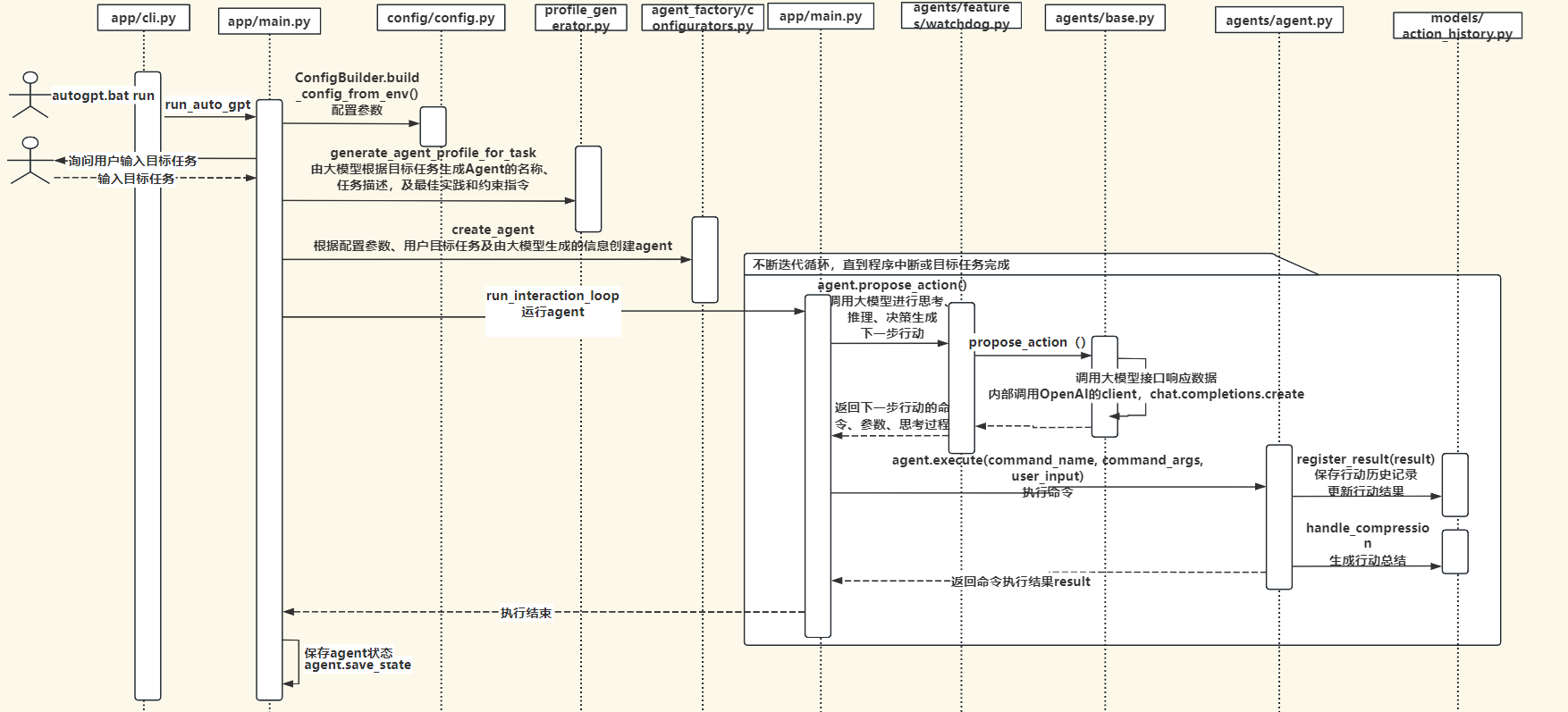
执行流程时序图
autoGPT整体执行流程时序图如下:
命令列表
autoGPT集成了一系列的行动命令,在autogpt/commands目录下,用户也可以根据需要开发自己的行动命令。
 1
 2
 3
 4
 5
 6
 7
 8
 9
10
11
|
## Commands
These are the ONLY commands you can use. Any action you perform must be possible through one of these commands:
1. list_folder: List the items in a folder. Params: (folder: string)
2. open_file: Opens a file for editing or continued viewing; creates it if it does not exist yet. Note: If you only need to read or write a file once, use `write_to_file` instead.. Params: (file_path: string)
3. open_folder: Open a folder to keep track of its content. Params: (path: string)
4. read_file: Read an existing file. Params: (filename: string)
5. write_file: Write a file, creating it if necessary. If the file exists, it is overwritten.. Params: (filename: string, contents: string)
6. ask_user: If you need more details or information regarding the given goals, you can ask the user for input. Params: (question: string)
7. web_search: Searches the web. Params: (query: string)
8. read_webpage: Read a webpage, and extract specific information from it. You must specify either topics_of_interest, a question, or get_raw_content.. Params: (url: string, topics_of_interest?: Array<string>, question?: string, get_raw_content?: boolean)
9. finish: Use this to shut down once you have completed your task, or when there are insurmountable problems that make it impossible for you to finish your task.. Params: (reason: string)
|
总结
AutoGPT是一项使用大模型自动化来完成任务的尝试,是运用ReAct(Reason + Act)框架来解决问题完成目标任务的优秀实践。运用大模型的泛化推理决策能力,结合可定制的工具列表,自主迭代循环思考与行动、逐步朝着完成目标方向前进,最终完成用户的目标。
autoGPT展示了AI大模型在自主完成任务方面的巨大潜力,随着大模型技术不断发展,类似autoGPT这样基于大模型的应用Agent也会不断完善发展,扩展大模型的能力边界,应用于企业或个人生活的各种场景,解决实际问题,并提供生产效率。
因水平有限,难免存在认识不足或理解错误的地方,欢迎各位批评指正,一起学习交流,非常感谢!
项目相关代码及文件放在网盘中,地址:
链接:https://pan.quark.cn/s/11ca682f0ec7
提取码:KXJr
参考资料
https://www.maartengrootendorst.com/blog/autogpt/
https://docs.agpt.co/autogpt/